Introduction
Azure Key Vault is a amazing service for securely storing and managing secrets like API tokens, connection strings, and certificates. However, when using it for scenarios involving frequent secret updates such as saving a new token every hour, there are some important limitations and best practices you need to be aware of.
In modern cloud applications, managing authentication tokens securely is crucial. Many APIs provide tokens that expire periodically (often every hour), requiring automated rotation to ensure uninterrupted service. In this blog, we’ll explore how to implement secure, automated token rotation using Azure Functions and Azure Key Vault.
The Challenge
When integrating with third-party APIs, you normally encounter tokens that:
- Expire every hour (or other intervals)
- Need to be refreshed automatically.
- Must be stored securely.
- Should be accessible to multiple applications.
Manual token management is error-prone and inefficient. We need an automated solution.
Real-World Scenario: Storing a New Token Every Hour
I recently worked on a requirement where a system generates a new token every hour, and we needed to store each token securely in Azure Key Vault. Multiple Logic Apps depended on this token, so ensuring secure storage and seamless accessibility was a key part of this implementation.
The Existing Setup
In the existing setup, a centralized Logic App was making a call to the system and generating a secure token every hour. Then the other Logic Apps were using that token to perform CRUD (Create, Retrieve, Update, Delete) operations. This was working quite well but at the same time was creating multiple secret versions, which needed proper management.
The approach which was used here
1. Use the same secret name
2. Save a new version of the secret every hour with the updated token
3. Disable the previous version each time a new token is saved
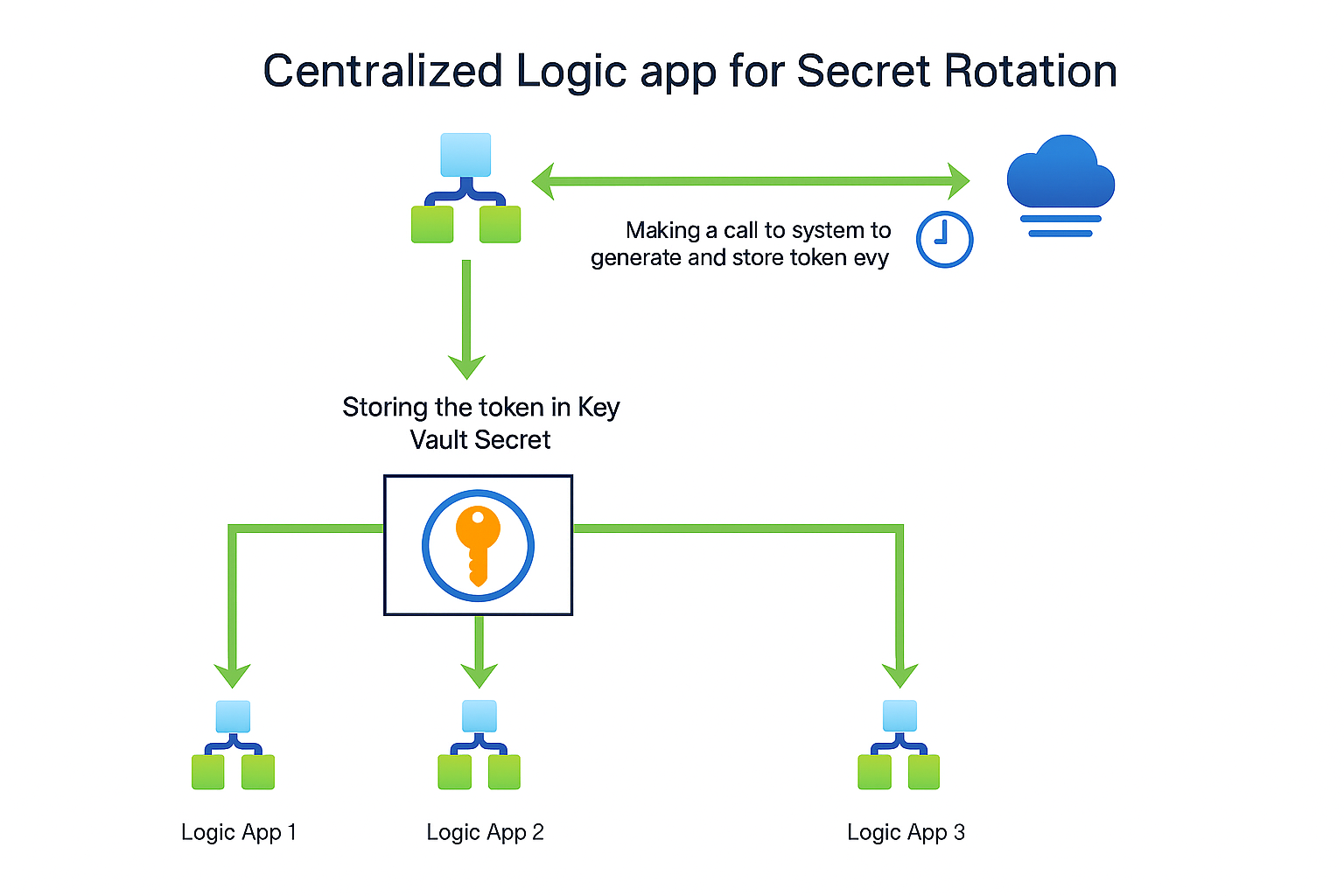
This sounds reasonable, but let’s analyze what happens under the hood. This is purely based on what I have observed.
What Happens When You Save New Secret Versions Hourly?
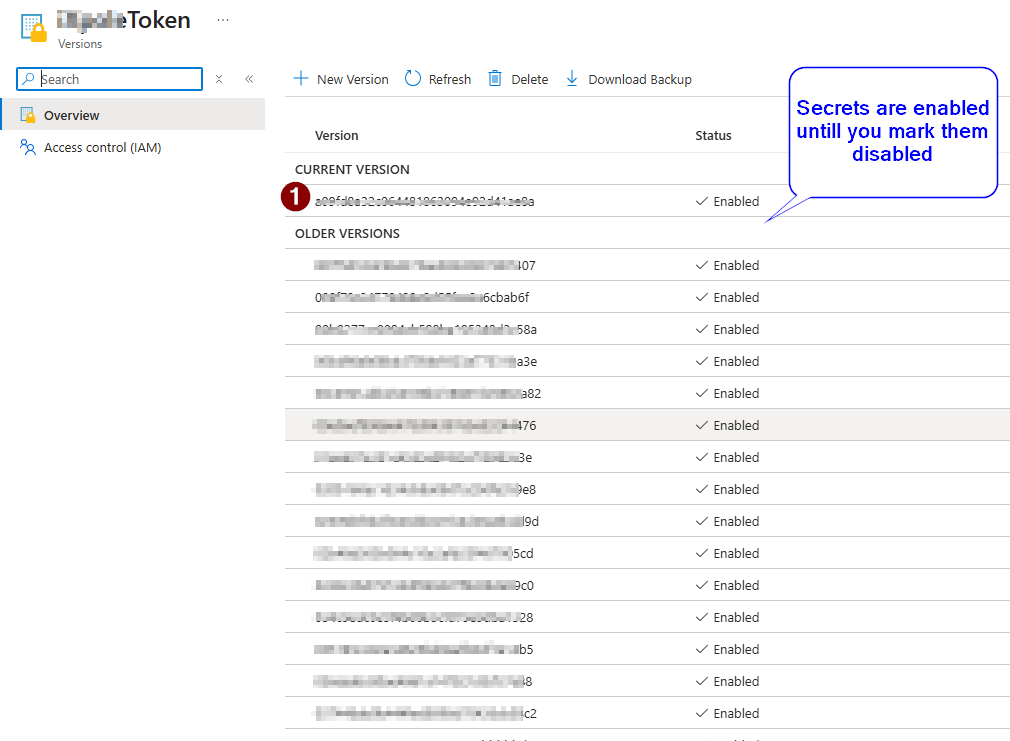
In Azure Key Vault, individual secret versions cannot be deleted. Each time a secret is updated, a new version is created, and Azure Key Vault does not provide an option to delete specific versions. The only available approach is to disable older versions or delete the entire secret itself. Because of this limitation, using a Logic App to rotate secrets results in accumulated secret versions over time.
Every new token creates a new secret version. By default, previous versions remain enabled unless you make it disabled. Over time, thousands of versions accumulate for the same secret.
How many versions over time?
1 token per hour = 24 tokens/day
In 6 months → 24 × 180 = 4,320 versions
In 12 months → 8,640 versions
Azure Key Vault does have a soft limit of 25,000 objects per vault, where an object can be a secret, key, or certificate. At the rate of one new version per hour, you’ll reach this limit in under 3 years if you don’t clean up old versions.
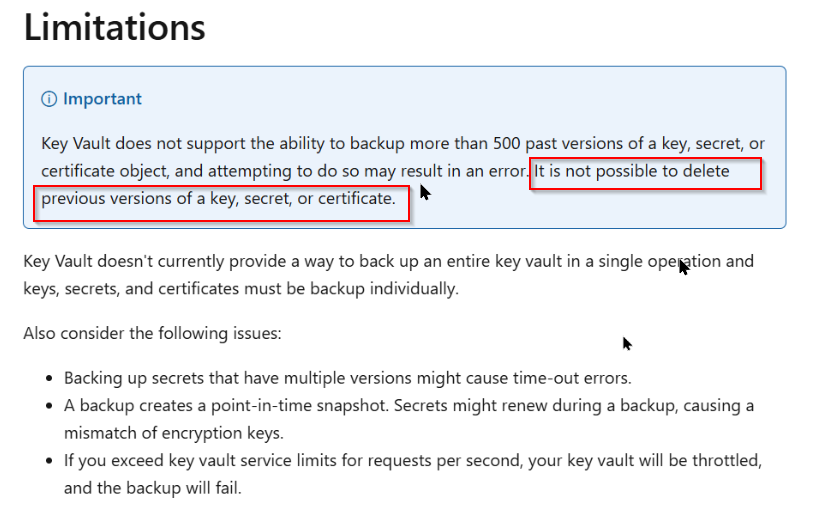
Issue also discussed here as well https://github.com/Azure/azure-cli/issues/8114
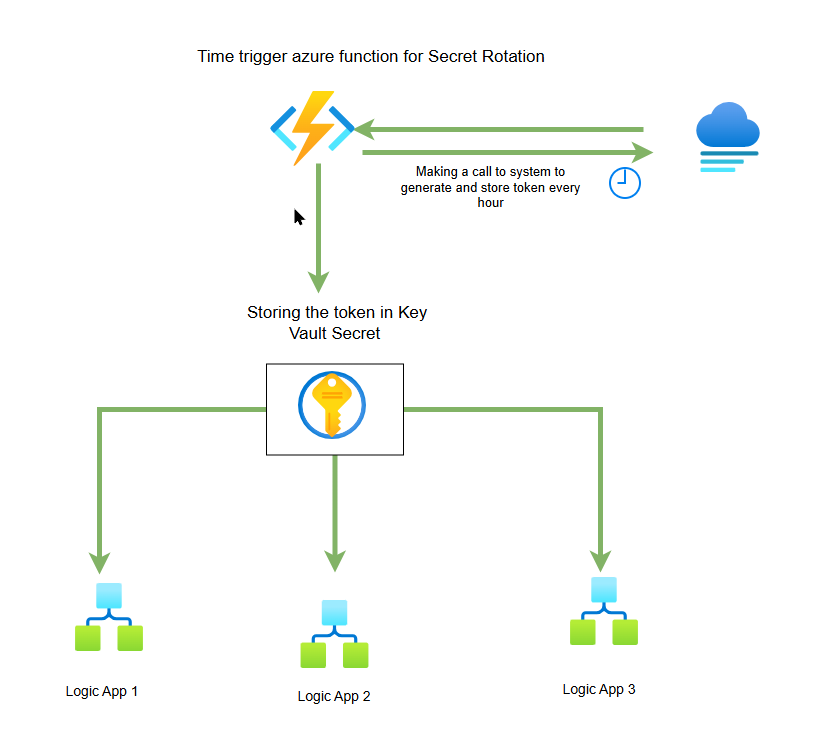
Deleting the secret option was not supported while using logic app. You can only disable the previous versions as mentioned in here https://learn.microsoft.com/en-us/azure/key-vault/general/backup?tabs=azure-cli. To solve the above problem, I have come up with different approach where I have replaced the logic app which was generating the token every hour with a time trigger azure function.
The Solution Architecture
Our solution uses three key Azure services:
- Azure Functions – Executes the token rotation logic on a schedule. (Time trigger)
- Azure Key Vault – Stores tokens securely with encryption at rest.
- Managed Identity – Enables secure authentication without storing credentials. (No Client Id and Secret required)
Implementation Options
Option 1 : Delete and Replace approach : In this approach, we will delete the secret itself (purge permanently) and then recreate the secret with the same name. In this way, there will always be the one secret with only one version. This is needed if you really want to delete the older version of that particular secret. Good to know that with the above logic app you cant delete the secret and hence code is needed in order to delete that. This approach deletes the old secret before creating a new one. Use this only if you need to avoid version accumulation.
Option 2 : Version Management with Cleanup (Also used in the logic app) : Well, this is something that logic app was already doing. With the azure function as well, deleting previous old versions of secret was not supported in the key vault. You can of course disable that.
- Use the same secret name for all token updates.
- Save a new version of the secret every hour with the updated token.
- Disable previous versions after the new token is saved.
Here is the simple comparison between those two approaches.
| Delete/Purge approach | Version Management with Cleanup approach |
| Timing complexity – Purge takes 20-30 seconds to complete | No timing issues – No need to wait for purge operations |
| Extra permissions – Requires purge permissions | Version history – Keeps one previous version as backup |
| More API calls – Delete + Purge + Create = 3 operations vs 1 update | Audit trail – Can see when tokens were rotated |
Note : In normal scenario, I would always recommend to go with option 2 (Version Management with Cleanup approach). However when there is requirement to not have many secret versions (even as disabled) then option 1 can be used. I will focus on the option 1 in this blog.
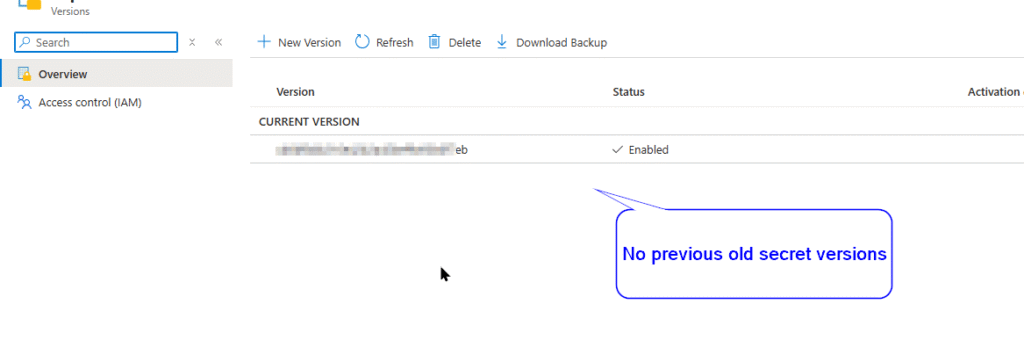
Based on the specific requirement from the user, I had followed option 1 approach where I am deleting the secret itself which automatically deletes all of its previous versions and then creating it programmatically.
You can use the below code to achieve the same.
[Function("TokenRotation")]
public async Task Run(
    [TimerTrigger("0 */58 * * * *")] TimerInfo myTimer)
{
    _logger.LogInformation("Token rotation started at: {time}", DateTime.UtcNow);

    try
    {
        string keyVaultUrl = Environment.GetEnvironmentVariable("KeyVaultUrl")
            ?? throw new InvalidOperationException("KeyVaultUrl not configured");
        string secretName = "ApiToken";

       //Using managed identity to get the credentials
        var credential = new DefaultAzureCredential();
        var secretClient = new SecretClient(new Uri(keyVaultUrl), credential);

        // Fetch new token from the your system
        var newToken = await FetchNewTokenAsync();
        _logger.LogInformation("New token retrieved successfully");

        // Delete old secret
        await DeleteAndPurgeSecretAsync(secretClient, secretName);

        // Create new secret
        await secretClient.SetSecretAsync(secretName, newToken);
        _logger.LogInformation("Token updated in Key Vault successfully");
    }
    catch (Exception ex)
    {
        _logger.LogError(ex, "Token rotation failed");
        throw;
    }
}

private async Task DeleteAndPurgeSecretAsync(SecretClient client, string secretName)
{
    try
    {
        // Check if secret exists
        KeyVaultSecret existingSecret = null;
        try
        {
            existingSecret = await client.GetSecretAsync(secretName);
        }
        catch (RequestFailedException ex) when (ex.Status == 404)
        {
            _logger.LogInformation("Secret doesn't exist, skipping delete");
            return;
        }

        if (existingSecret != null)
        {
            // Soft delete
            _logger.LogInformation("Deleting secret '{name}'", secretName);
            var deleteOperation = await client.StartDeleteSecretAsync(secretName);
            await deleteOperation.WaitForCompletionAsync();
            _logger.LogInformation("Secret soft deleted");

            // Purge permanently
            try
            {
                await client.PurgeDeletedSecretAsync(secretName);
                _logger.LogInformation("Secret purged");

                // CRITICAL: Wait for purge to complete
                _logger.LogInformation("Waiting 30 seconds for purge to complete...");
                await Task.Delay(TimeSpan.FromSeconds(30));
            }
            catch (RequestFailedException ex) when (ex.Status == 404)
            {
                _logger.LogInformation("Secret not found in deleted state");
            }
        }
    }
    catch (Exception ex)
    {
        _logger.LogError(ex, $"Error during delete/purge operation {ex.Message}");
        throw;
    }
}
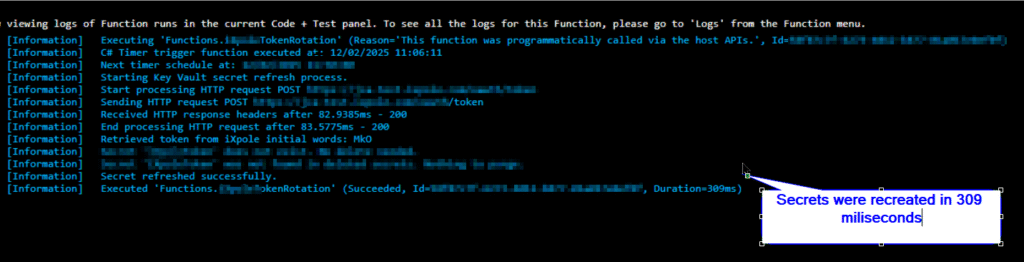
This was my output in the logging screen. It took just 309 milliseconds to recreate the secret.
Additionally lets check if the key vault show previous versions or not. Here is the screenshot.
Common Issues and Solutions
Issue 1: You can run into below error If you dont apply the wait for few seconds between deletion and creation of the secret. Azure key vault purge is asynchronous. Even though PurgeDeleteSecretAsync returns, the backend may still be finalizing the purge. If you call SetSecretAsync too soon, you can hit the transient error like below :
Message: Secret ‘Token’ is currently being deleted and cannot be re-created; retry later. Status: 409 (Conflict) ErrorCode: Conflict Content: {“error”:{“code”:”Conflict”,”message”:”Secret Token is currently being deleted and cannot be re-created; retry later.”,”innererror”:{“code”:”ObjectIsBeingDeleted”}}}
Cause: Insufficient wait time after purging secret. I faced this issue where the secret was deleted but new secret was not created as it took few more seconds in the first run but SetSecretAsync has already run.
Solution: Increase delay to 5-10 seconds after purge.
Issue 2: If your managed identity of azure function doesnt have “Azure key vault secret officer” role, you may run into permission issues.
If you have any questions, feel free to reach out in comments.

Dynamics 365 Senior Consultant with deep expertise in customization, optimization, and integrations. Committed to giving back to the CRM community by breaking down complex concepts, sharing real-world insights, and helping others succeed with Dynamics 365 & Azure.
2 Responses
Very nice explanation.
Really helpful
Thank you. Glad that you liked it.